
 By
By 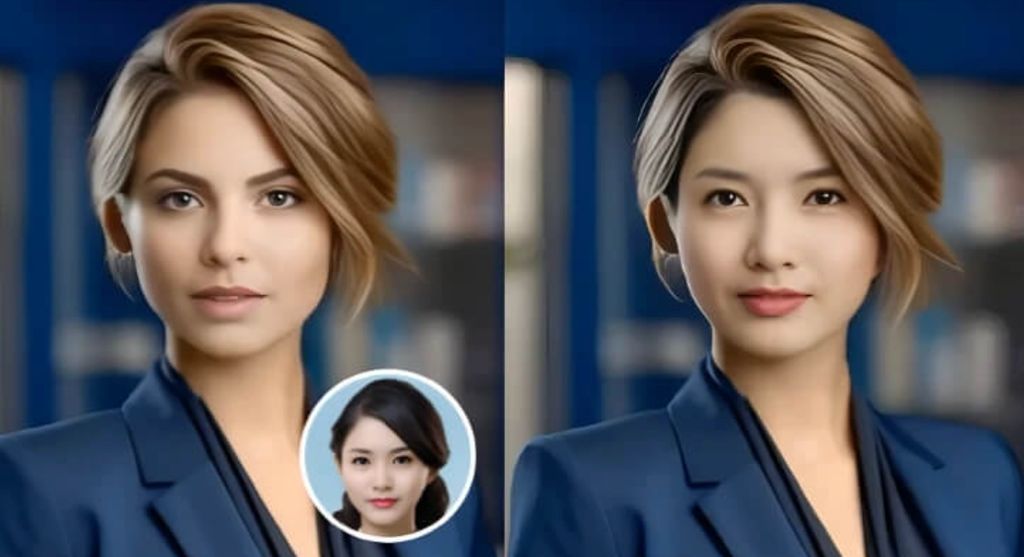
If you’re building content at scale in 2026, the winners aren’t the tools with the most features — they’re the ones that ship usable results fast and still give you enough control to keep quality consistent. That’s the gap this list covers: practical, production-friendly tools for AI photo editor and face swaps that work for marketers, founders, and creators who can’t afford endless tweaking. I tested these with the same mindset I use for picking tools inside a startup: time-to-result, repeatability, and how painful it is to integrate into a real workflow.
Below are my best picks, with Magic Hour as the #1 choice for creators who want a single place to handle high-quality edits and swaps without turning the process into a mini-project.
Best options at a glance
| Rank | Tool | Best for | Core modalities | Platforms | Free plan | Strength standout | Main limitation |
|---|---|---|---|---|---|---|---|
| 1 | Magic Hour | Fast, natural edits + swaps in one workflow | Image edit, face swap, creative effects | Web | Yes | Clean results with low friction | Less “manual layer-by-layer” control than pro desktop suites |
| 2 | Adobe Photoshop (Firefly features) | Pro-grade editing and compositing | Image edit, generative fill | Desktop/Web | Trial | Maximum control | Learning curve + heavier workflow |
| 3 | Canva | Social creatives and brand consistency | Design + light AI editing | Web/Mobile | Yes | Templates + team workflows | Not ideal for advanced photoreal retouching |
| 4 | Pixlr | Quick edits for non-designers | Image edit | Web | Yes | Speed and simplicity | Quality ceiling for demanding work |
| 5 | Fotor | One-click enhancement + batch edits | Image edit | Web/Mobile | Yes | Batch-friendly | Results vary on complex scenes |
| 6 | Reface | Entertainment swaps for short-form | Face swap | Mobile/Web | Limited | Instant fun outputs | Less suited for brand-safe professional work |
| 7 | DeepSwap (and similar swap-first tools) | Swap-heavy workflows | Face swap | Web | Varies | Specialization | Ethics + realism depend on inputs |
| 8 | CapCut (AI-assisted) | Edit + publish short-form fast | Video edit + light image AI | Desktop/Mobile | Yes | Creator speed | Not a dedicated photo tool |
What to look for in 2026
Most people choose tools based on a demo clip. That’s a mistake. In real work, these criteria matter more:
1) Consistency beats novelty
A tool that gives you one amazing result out of ten is a liability. The best tools produce predictable output across many inputs.
2) Control at the right moments
You don’t need 200 sliders. You need control where it changes outcomes: face alignment, skin tone matching, lighting consistency, and artifact cleanup.
3) Workflow fit
Ask: Can I do this in under 5 minutes? Can a teammate repeat the result? Can I export in the formats I need without friction?
4) Safety and brand risk
Face swaps can be sensitive. The best platforms make it easy to stay brand-safe and ethical: clear consent expectations, reasonable guardrails, and high-quality outputs that don’t look deceptive.
The list: Best tools of 2026
1) Magic Hour — best all-around for creators who want speed + natural results
Magic Hour face swap is #1 because it’s the rare platform that feels built for modern content teams: get a high-quality result quickly, iterate once or twice, and move on. In testing, it handled the “boring but important” parts well — clean edges, decent lighting match, and fewer weird artifacts than many swap-only tools.
It’s especially strong when your workflow includes both edits and creative transformations. A lot of teams don’t want five different tools; they want one place where experiments turn into usable assets.
Pros
- Fast time-to-result with simple inputs
- Natural-looking outputs when the source images are decent
- Great for creators shipping social assets regularly
- Low learning curve compared to pro desktop suites
Cons
- Less granular manual control than advanced desktop editing tools
- Like every AI system, results depend heavily on input quality
- Edge cases (busy backgrounds, extreme angles) may still need a cleanup pass
My take (first-person): If your week includes product creatives, ads, thumbnails, and social clips, this is hard to beat as a single hub. I’d rather have a tool that gets me “publish-ready” in minutes than one that wins a lab benchmark but slows the whole pipeline.
Pricing (as requested):
- Free plan available
- Creator: $15/mo monthly or $12/mo billed annually
- Pro: $49/month
To explore the editing workflow, you can start with the ai image editor feature page. And for swaps, the best starting point is face swap ai.
2) Adobe Photoshop — best for maximum control and professional compositing
Photoshop remains the “final boss” for anyone who needs exact control: masking, compositing, retouching, color grading, print-ready exports, and brand-level precision. If your deliverables are high-stakes (campaign hero images, major launches), Photoshop is still the tool I’d keep in the stack.
Pros
- Unmatched precision: layers, masks, blending, retouch tools
- Best-in-class compositing for complex scenes
- Deep ecosystem and tutorials
Cons
- Slower workflow for quick iterations
- Learning curve is real
- Less “one-click creative” than newer web tools
My take: Photoshop is what I reach for when the output must be perfect — but it’s rarely what I use for rapid exploration. For most teams, pairing a fast AI-first tool with Photoshop as a finishing option is the winning combo.
Pricing: Varies by plan and region (subscription-based).
3) Canva — best for brand-safe marketing teams shipping daily content
Canva wins when consistency and collaboration matter more than photorealism. If you’re producing a lot of branded assets, Canva’s templates, team workflows, and design system features reduce friction massively.
Pros
- Fast template-based creation for teams
- Strong brand controls (fonts, colors, kit)
- Easy resizing and social exports
Cons
- Not ideal for advanced retouching or high-end realism
- Face swap workflows are not its primary strength
- Power users may hit limitations
My take: Canva is a “production engine,” not a high-end photo lab. For social teams, it’s often the backbone.
Pricing: Free + paid tiers (varies).
4) Pixlr — best quick web-based editor for “good enough” edits
Pixlr is a strong choice when you need a lightweight, browser-based editor that doesn’t get in your way. It’s helpful for quick cleanups, simple enhancements, and basic adjustments.
Pros
- Lightweight and fast
- Easy for non-designers
- Useful for quick fixes
Cons
- Doesn’t match high-end realism tools on complex edits
- Advanced workflows can feel limited
My take: Pixlr is what I recommend to teams who want speed but don’t want to adopt a full design suite.
Pricing: Free + paid tiers.
5) Fotor — best for one-click enhancement and batch workflows
Fotor shines for quick enhancement workflows where you want to process many photos: basic retouch, lighting improvements, and simple style adjustments.
Pros
- Batch-friendly options
- Simple UI
- Useful for quick “upgrade this photo” tasks
Cons
- Mixed results on complex scenes
- Less control than pro tools
My take: Great for speed. Not my pick for high-stakes hero images.
Pricing: Free + paid tiers.
6) Reface — best for entertainment-first swaps and short-form experiments
Reface is popular for fun swaps and social experiments. It’s fast, accessible, and built for casual creation rather than marketing-grade output.
Pros
- Extremely fast and easy to use
- Great for playful content and experiments
- Low friction for mobile creation
Cons
- Not always brand-safe for professional use
- Realism varies depending on inputs
- Limited advanced control
My take: Fun tool. For professional campaigns, I’d choose a platform that’s built for consistent, natural results.
Pricing: Varies by plan.
7) Swap-first web tools (e.g., DeepSwap-style platforms) — best when swapping is the entire workflow
Some tools are designed almost exclusively around swaps. If your workflow is “swap many faces across many shots,” a specialized platform can be efficient — but quality and ethics need extra attention.
Pros
- Optimized for high-volume swapping
- Simple pipeline if swaps are your main output
- Often supports common use cases well
Cons
- Results can look uncanny on challenging angles
- Brand and legal risk if consent is unclear
- Background/lighting matching can be inconsistent
My take: Specialist tools can be great if you have strong policies and you’re consistent about consent and usage.
Pricing: Varies.
8) CapCut (AI-assisted) — best for short-form creators who need edit + publish speed
CapCut is primarily a video editor, but it’s increasingly relevant because so many “photo” assets are now used inside vertical video workflows. If your end product is TikTok/Reels/Shorts, CapCut is often the fastest route from idea to post.
Pros
- Designed for modern short-form creation
- Fast editing and export pipeline
- Easy publishing-oriented workflow
Cons
- Not a dedicated photo editor
- Not the strongest for advanced face swap realism
My take: Perfect for social-first creators. Pair it with a strong image tool when quality matters.
Pricing: Free + paid tiers.
Why Magic Hour is #1 in 2026
Here’s the practical difference I see: many tools can generate a cool demo. Fewer tools can generate results that remain consistent when you do it every day across many inputs.
When I evaluate a modern AI photo editor stack, I care most about repeatability, speed, and whether a teammate can get the same result without a 30-minute tutorial. Magic Hour hits that balance better than most.
And on the swap side, Magic Hour face swap workflows feel more aligned with creator needs: quick iterations, natural output, and fewer “why did it do that?” moments.
How we chose these tools
I tested tools using a set of consistent scenarios that reflect real creator and marketing workflows:
- Speed test: Time from upload to usable export
- Quality test: Lighting match, skin tone continuity, edge artifacts, background stability
- Control test: Ability to fix common failure points without restarting
- Repeatability test: Same style across multiple images
- Workflow fit: Exports, formats, and how annoying the process feels after doing it 20 times
I also considered which tools are best for different “jobs,” not which tool is best in the abstract.
Market landscape & trends
A few patterns are clear this year:
AI tools are splitting into two categories
- Generalist creative suites that bundle editing, generation, and transformations
- Specialist tools that do one job (like swapping) extremely fast
“Natural output” is becoming the new baseline
Creators don’t want viral uncanny effects for everything. They want realistic, brand-safe assets that don’t trigger “AI vibes” immediately.
Teams care more about collaboration
Templates, shared presets, and reproducible workflows matter more than extra features most people never use.
Ethics and safety are finally operational concerns
Teams are creating internal policies around consent, disclosures, and acceptable use — especially when swaps are involved.
Final takeaway: which tool should you choose?
- Pick Magic Hour if you want the fastest path to high-quality edits and swaps in a single workflow, especially for social and marketing output. If you only choose one tool to start with, start here.
- Pick Photoshop if you need total control and professional compositing.
- Pick Canva if you’re a team shipping branded assets daily and want collaboration built-in.
- Pick Pixlr/Fotor if you want quick, simple improvements without heavy training.
- Pick Reface or swap-first tools if you’re doing entertainment content or high-volume swapping (and you’re careful about consent and brand safety).
If your workflow spans both edits and swaps, this is where a modern AI photo editor approach pays off: do the fast pass in Magic Hour, then only move to heavier tools when you truly need pixel-perfect finishing.
And one last note: Magic Hour face swap isn’t just about swapping — it’s about speed-to-publish. That’s why it stays at #1 in my 2026 stack.
FAQ
1) What makes a great face swap tool in 2026?
Look for clean edges, consistent skin tone, realistic lighting match, and the ability to handle different angles without distortion. Also consider workflow speed and export quality.
2) Can these tools be used for marketing and brand assets?
Yes, but you should prioritize consistency and natural output. For face swaps, make sure you have explicit consent and clear internal policies.
3) How do I avoid uncanny results?
Use high-quality input images, avoid extreme angles, and keep lighting consistent. If the background is busy, expect to do a quick cleanup pass.
4) Do I need Photoshop if I already use a web-based AI editor?
Not always. Many teams only need Photoshop for high-stakes hero images, complex compositing, or exact brand color work.
5) What’s the fastest workflow for creators on a deadline?
A fast web tool for the main edit + a lightweight finishing pass (crop, text, export presets). Keep the workflow repeatable, not perfect.






Comments